

Dash Cam Installation for Trucks & Fleets
Installing a dash cam in a truck is a crucial process that extends far beyond merely attaching an adhesive mount to the windshield. For both large commercial fleets and independent owner-operators, it represents a significant investment in several key areas: risk mitigation, operational transparency, and driver accountability.
Risk Mitigation: Dash cams provide irrefutable video evidence in the event of an accident, false claim, or road incident. This footage can be critical in proving innocence, disputing liability, and expediting insurance claims. It helps protect drivers and companies from fraudulent claims, potential lawsuits, and unnecessary financial burdens. Furthermore, the presence of a dash cam can act as a deterrent against aggressive driving or road rage incidents, contributing to safer road conditions.
Operational Transparency: Dash cams offer invaluable insights into daily operations. They can record routes, driving habits, and even interactions with customers or law enforcement. This transparency allows fleet managers to monitor driver performance, identify areas for improvement in efficiency and safety, and ensure compliance with company policies and regulations. In cases of discrepancies or complaints, the video record provides an objective account of events.
Driver Accountability: With a dash cam, drivers are more aware that their actions are being recorded, which often leads to improved driving behavior and adherence to traffic laws. This increased accountability can reduce instances of speeding, harsh braking, and other risky maneuvers. The footage can also be used for driver coaching and training, highlighting specific areas where a driver can enhance their skills and safety practices. Ultimately, this fosters a culture of responsible driving and professionalism within a fleet.
In essence, a properly installed and utilized dash cam system transforms a truck from a simple vehicle into a data-rich, proactive tool for managing risks, enhancing operational oversight, and ensuring the highest standards of driver performance.
Why Dash Cams Are Essential for Truck Operations
Dash cams do far more than record collisions—they deliver data, accountability and visibility into driver behaviour, cargo condition and fleet operations.
Key operational benefits
- Liability reduction: Large trucks carry higher risks—accidents, contested claims, freight damage. A dash cam acts as a “black box” to document events objectively.
- Driver behaviour monitoring: Modern systems go beyond video—they monitor harsh braking, lane departure, idling and unsafe habits, offering actionable insights.
- Fleet visibility & analytics: When integrated with GPS/telematics, dash cams provide timestamped location data, event tagging and remote access, enabling proactive safety programs.
- Insurance & cost savings: Footage often leads to resolution of disputed claims, fewer lawyer fees and may contribute to premium reductions as safety evidence.
- Owner-operator value: Even single-truck operations benefit: one incident video can offset installation cost many times over.
Why trucks differ from cars
Trucks present unique demands:
- Many run 24-volt electrical systems, not 12 V; components must support this.
- Mounting and wiring become more complex due to cab structure, curtains, high windshields, trailer attachments.
- The operational context matters: idle times, parking in yards, multiple cameras (front, rear, side) and integration with trailer systems.
Bottom line: View the dash cam not as a camera, but as an embedded data-asset in your safety and operations stack.

Planning Your Truck Dash Cam Installation
Approach installation by aligning objectives, choosing compatible gear, mapping wiring routes, scheduling installation and documenting procedures.
Define your goals
- Decide camera channels: front only? front + rear? multi-camera (front, cabin, side)?
- Will you enable parking/yard mode (monitor when vehicle is off)?
- Do you need live-feed or remote access for fleet oversight?
- What budget and ROI timeframe are you targeting? Consider premium equipment may pay off via fewer incidents and disputes.
Equipment compatibility checklist
- Ensure device supports 12 V and 24 V systems, especially for heavy trucks.
- Prioritise truck-rated mounts: high vibration, wider temperature range, longer cable runs.
- If multiple cameras (rear, side) are needed, ensure the system supports them.
- Hard-wire kits must support both accessory and continuous power circuits if parking mode is required.
Mapping wiring and mounting locations
- Front camera typically sits behind the rear-view mirror, above wiper sweep zone, out of driver line-of-sight.
- Rear or trailer-mounted camera(s): inside rear window, on bulkhead or external mount—must capture cargo area/trailer interface.
- Cable routing: along headliner, down A-pillar, behind kick panels; avoid airbags, moving parts, tractor-trailer gaps.
- Power source: Decide between fuse-tap hard-wire vs plug-in 12 V socket. Hard-wire offers parking mode; plug-in is simpler but may disable standby recording.
Tools & materials
- Dash cam kit and mount(s)
- Hard-wire kit rated for 12/24 V systems (fuse-tap harness, inline fuse)
- Zip ties, trim-clips, cable-tie tools
- Panel removal tool/pry bar
- Multimeter (to test power sources)
- Cleaning cloth & isopropyl for glass surface
- microSD card and spare, ideally U3 rated
- Time allotment: plan 1–2 hours for a standard installation (more if multiple cameras/trailer runs).
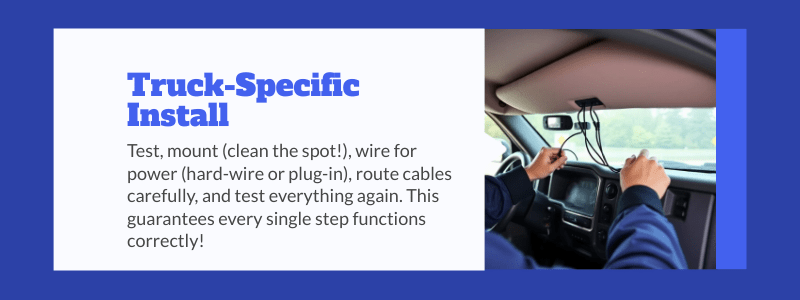
Step-by-Step Truck-Specific Installation
Follow a structured sequence—test gear, mount cameras, wire power, route and hide cables, then test and activate parking mode.
Step 1: Pre-check equipment
- Plug in the dash cam to verify it powers up, displays menus and accepts the microSD card.
- Set date/time, GPS lock if applicable.
- Temporarily mount to validate angle/field of view before full installation.
Step 2: Choose & clean mounting spot
- Clean windshield behind the rear-view mirror or a non-tinted band. Use alcohol wipe to remove film or smudge.
- Avoid black dotted band where adhesives adhere poorly.
- For truck cab height, aim to include part of the hood/trailer interface for better orientation.
Step 3: Mount camera and adjust angle
- Secure the adhesive or suction mount. Press firmly (~30 seconds) to achieve bond.
- Adjust the lens: horizon should be level, field should include forward traffic flow and side edges.
- Rear camera (if used): mount on rear window or trailer bulkhead; ensure no obstructions or reflections.
Step 4: Power wiring
Hard-wire method
- Locate fuse box: identify ignition-on (accessory) fuse and always-hot fuse if parking mode needed.
- Use a multimeter to confirm voltage.
- Connect red wire to fuse-tap, black wire to a factory ground (bolt under dash, metal part of body).
- Secure wires: route along headliner, down A-pillar, under dash, avoiding airbags.
Plug-in method
- Simple: plug power cable into 12 V socket. Less invasive, but parking mode may be disabled.
- Hide excess cable under trim/panels.
Step 5: Cable routing & trim re-fit
- Remove/loosen A-pillar trim, tuck wire behind it, not over.
- Route wire down door-jamb rubber, along kick-panel, avoid interfering with driver’s footwell or pedals.
- Use zip ties/clips to secure wires; coil excess and hide under carpet or trim.
- Refit all panels, ensure nothing interferes with airbags or seatbelt mechanisms.
Step 6: Final setup & test
- Start engine: verify dash cam powers on and begins recording.
- From driver seat: confirm that camera’s field of view is optimal and device does not obstruct windshield or view.
- Insert microSD card, check loop recording, event save (via G-sensor) works.
- For fleets: register device in telematics dashboard, enable WiFi/LTE connectivity.
- Rear camera (if used): confirm image is clear, lens unobstructed, cables hidden.
Step 7: Parking/Yard mode (optional)
- Configure the dash cam to monitor while vehicle is parked (motion or impact triggered).
- Verify that power draw is acceptable—especially important for trucks with long idle times.
- Communicate to drivers that parking mode is active. Set SOPs for truck parked overnight (e.g., ensure battery is fully charged, alternate power feed cut-off if necessary).

Operational Integration & Maintenance
Installation is only the beginning. The long-term value comes from consistent use, management, data review and continuous improvement.
Footage review & driver coaching
- Develop SOPs: review incidents, driver behaviour, near-miss events.
- For fleets: integrate footage into on-platform dashboards (GPS + event + video). Tag events (harsh braking, speed, lane departure).
- Use footage for driver training: highlight safe behaviour, recognise improvement, support corrective training.
Data storage & retention policy
- Define retention length: typically 30–90 days unless incident-locked.
- Loop recording and microSD card management are critical—plan for high-capacity and high endurance storage.
- For fleets: consider cloud upload / remote retrieval to minimise manual card swap.
Power system and battery health
- Hard-wire installations: monitor battery draw, shutdown thresholds, ensure parking mode doesn’t drain battery overnight.
- Conduct periodic inspections: fuse taps tight, connectors clean, no frayed wiring.
- For long-haul trucks: evaluate use of battery-cut-off or secondary batteries for dash cam standby.
Firmware and hardware updates
- Keep dash cam firmware current—manufacturers release improvements for sensors, heat tolerance, recording stability.
- Replace microSD cards regularly—especially in high-vibration, heat-intense truck cabs.
- Monitor camera mount adhesion: vibration loosens adhesive over time.
Driver acceptance & change management
- Communicate purpose clearly: safety, protection, not surveillance.
- Provide driver training or onboarding: how the system works, what footage is used for, retention policy.
- Address privacy concerns: in-cab audio, interior cameras—set clear policy and signage if needed.
ROI tracking and cost-benefit analysis
- Metrics to track: reduction in disputed claims, average claim cost before vs after, driver behaviour improvement scores, insurance premium changes.
- Use footage credit: one avoided major claim can justify dozens of installations.
- Adjust budget annually: allocate funds for camera replacement, maintenance, data storage.
Compliance, Legal & Safety Considerations
Answer-first summary:
While dash cams are powerful, compliance with mounting, wiring and privacy laws is essential—especially in commercial vehicle contexts.
Windshield mounting requirements
- Mounting spots must not obstruct driver’s view. Some jurisdictions limit device coverage to specified regions.
- In trucks with larger windshields, ensure camera placement meets local vehicle inspection/mounting rules.
Electrical and vehicle system integrity
- Improper wiring can interfere with airbags, vehicle electronics or cause fire risk—ensure both hardware and wiring comply with automotive standards.
- Hard-wiring must be done with correct fuse rating, high-quality taps and secure ground point.
Data and privacy law implications
- Video with audio may trigger surveillance law obligations—inform drivers, obtain consent where required.
- For fleets operating across states or countries, verify jurisdictions’ rules about audio recording, camera use, data retention.
Insurance and regulatory disclosure
- Some insurers require disclosure when devices are hard-wired modifications—failure to disclose may affect coverage.
- Commercial vehicle regulators may inspect equipment; dash cams mounted incorrectly or obstructing view could result in citations.
Safety & driver distraction
- Dash cam displays or controls must not distract the driver. Set up recording/monitoring off-hours or when stationary.
- Cables must not interfere with driver controls, pedals or airbags.
Troubleshooting & Common Pitfalls in Truck Installations
Identifying and addressing frequent errors early prevents costly rewires or system failures.
Mounting & field-of-view issues
- Camera too low or angled incorrectly → horizon skewed, road edges cut off.
- Adhesive mount applied to dirty or curved area → mount falls.
- Rear camera mounted inside trailer door without proper view → unusable footage.
Wiring and power errors
- Fuse tap inserted in wrong slot → camera powers only when ignition is off or never.
- No inline fuse added → risk of electrical fault.
- Cable routing across airbags or driver footwell → safety hazard.
Thermal & vibration stress
- Truck cabs see wide temperature swings and constant vibration. Budget cams may fail. Use truck-rated gear.
- MicroSD cards in high-heat environments degrade faster—use industrial/high endurance cards.
Data overload & no operational use
- Installing cameras but never reviewing footage means wasted investment. Create review workflows.
- Lack of retention policy → storage crumbles, system slows.
- Drivers intimidated or unaware of purpose → push-back, tampering, non-use.
Parking mode over-draw
- If parking mode is enabled but battery capacity insufficient, backup battery drain can cause truck non-start. Implement cutoff thresholds or secondary battery.

Advanced Strategies for Fleets and High-Performance Use-Cases
Beyond basic installation, advanced fleets integrate dash cams into telematics, predictive maintenance and behavioural analytics for maximum value.
Integrating with telematics & fleet management
- Link dash cam event triggers (G-sensor, lane departure) with GPS speed/time to create incident-machine learning logs.
- Use analytics: track repeat drivers, high-risk routes, correlate camera events with maintenance, fuel usage, idle time.
- Live-feed or cloud access: monitor moving vehicles in real time, receive alerts for collisions, harsh events or parking incidents.
Driver safety programs
- Use recorded footage as coaching content: show both good and risky behaviour.
- Gamify driver behaviour: reward safe runs, low incident scores, minimal harsh events.
- Provide monthly “video review” sessions—show top-10 safe footage and top-10 improvement opportunities.
Trailer and cargo monitoring
- Extend cameras to trailer bulkhead or cargo area: monitor load shifting, theft, door openings.
- Combine with telematics to monitor seals, door status, cargo temperature (where relevant) and camera logs.
Predictive maintenance & risk forecasting
- Correlate dash cam incident data with maintenance records: e.g., repeated hard-braking events may indicate worn brakes or driver fatigue.
- Use video analytics to feed into risk modelling: drivers/routes with higher incident footage may require higher insurance premium or more training.
Upscaling for multi-channel rigs
- Multi-camera rigs (front, side, rear) are increasingly standard in higher-value operations (haz-mat, long-haul, regional freight).
- Consider 3-channel or 4-channel systems: e.g., front + cabin + trailer rear + side.
- Networking: ensure installation wiring scales accordingly, use professionally rated mounts/bridles for long cable runs.
Checklist for Truck Dash Cam Deployment
Use this checklist to ensure you cover all critical installation, operational and review elements.
- Define objectives: number of channels, parking mode requirement, integration level.
- Select compatible equipment: supports 12/24 V, dual-channel or more, truck-rated mount, hard-wire kit.
- Map wiring and mounting: front camera placement, rear/trailer camera placement, cable routing plan.
- Schedule installation: allocate tools, time, trained installer or DIY with guideline.
- Pre-check: power‐up unit, set date/time, verify microSD, test lens view.
- Install mount & lens: clean surface, apply adhesive, aim lens, secure bracket.
- Power wiring: locate fuse box, test fuse positions, wire red to accessory/hot, black to ground, secure harness.
- Route cables: headliner → A-pillar → kick panel, avoid airbags/pedals, secure tie wraps.
- Final test drive: verify power on with ignition, recording, G-sensor event save, field-of-view.
- Parking mode activation: configure if required, monitor battery draw.
- Operational rollout: driver briefing, privacy/usage policy, footage review workflow.
- Maintenance schedule: firmware update, microSD refresh, mount inspection, battery draw check.
- Data analytics: review incident patterns, driver behaviour reports, integrate with telematics.
- ROI tracking: claims avoided, insurance premium impact, driver scores, maintenance correlation.
FAQs: Truck Dash Cam Install
Q1: Can I use a consumer-grade dash cam in a truck?
Yes, but be cautious: consumer models may not support 24 V systems, may lack parking mode, or fail under vibration/heat in truck environments. A truck-rated unit increases reliability and longevity.
Q2: What’s the difference between hard-wire and plug-in power?
- Plug-in (12 V socket) is simpler, less invasive, but parking/yard mode may not work if socket powers off with ignition.
- Hard-wire offers accessory power plus constant power feed, enabling parking mode, but requires proper fuse-tap, wiring and voltage monitoring.
Q3: Where should I mount the front camera in a truck?
Behind the rear-view mirror or above the wiper sweep area, ensuring the lens has an unobstructed view of the road ahead while minimizing obstruction to driver’s vision. Higher vantage point in trucks helps include hood and road context.
Q4: How do I ensure the wiring is safe and hidden?
Route wiring along headliner, down A-pillar (not over), tuck behind kick panel, secure with zip ties away from airbags and moving parts, avoid loose wires in footwell.
Q5: How long should I retain video footage?
Retention varies by use case: fleets often keep 30–90 days loop unless incident-locked; some keep longer (6–12 months) for high-risk operations. Ensure microSD capacity matches retention, and cloud upload is leveraged if needed.
Q6: What about privacy and driver consent?
Inform drivers that cameras are in use, set clear policy around audio recording, in-cab cameras, footage review, retention, and who can access videos. Compliance helps with driver buy-in and regulatory risk.
Best Way to Install Dash Cams in Trucks
Installing dash cams in trucks is a strategic investment—not just a camera mount. For fleets and owner-operators, the right equipment, installation approach and operational process combine to deliver measurable benefits: fewer disputed claims, better driver behaviour, improved visibility, and potential cost savings.
Follow this guide, use the checklist to ensure full coverage, treat the system as part of your data infrastructure, and turn what many view as a “safety camera” into an integral operational asset.
When you tie camera footage into your broader telematics, driver performance reviews, maintenance logs and fleet analytics, you elevate it from reactive evidence tool to proactive performance engine.